Configuration
Appliances XML
The appliances.xml is a file that lists all the appliances in a
cluster of archiver appliance. While it is not necessary to point to the
same physical file, the contents are expected to be identical across all
appliances in the cluster. The details of the file are outlined in the
ConfigService
javadoc. A sample appliances.xml with two appliances looks like
<appliances>
   <appliance>
     <identity>appliance0</identity>
     <cluster_inetport>archappl0.slac.stanford.edu:16670</cluster_inetport>
     <mgmt_url>http://archappl0.slac.stanford.edu:17665/mgmt/bpl</mgmt_url>
     <engine_url>http://archappl0.slac.stanford.edu:17666/engine/bpl</engine_url>
     <etl_url>http://archappl0.slac.stanford.edu:17667/etl/bpl</etl_url>
     <retrieval_url>http://archappl0.slac.stanford.edu:17668/retrieval/bpl</retrieval_url>
     <data_retrieval_url>http://archproxy.slac.stanford.edu/archiver/retrieval</data_retrieval_url>
   </appliance>
   <appliance>
     <identity>appliance1</identity>
     <cluster_inetport>archappl1.slac.stanford.edu:16670</cluster_inetport>
     <mgmt_url>http://archappl1.slac.stanford.edu:17665/mgmt/bpl</mgmt_url>
     <engine_url>http://archappl1.slac.stanford.edu:17666/engine/bpl</engine_url>
     <etl_url>http://archappl1.slac.stanford.edu:17667/etl/bpl</etl_url>
     <retrieval_url>http://archappl1.slac.stanford.edu:17668/retrieval/bpl</retrieval_url>
     <data_retrieval_url>http://archproxy.slac.stanford.edu/archiver/retrieval</data_retrieval_url>
   </appliance>
 </appliances>
The archiver appliance looks at the environment variable
ARCHAPPL_APPLIANCESfor the location of theappliances.xmlfile. Use an export statement like soexport ARCHAPPL_APPLIANCES=/nfs/epics/archiver/production_appliances.xml
to set the location of the
appliances.xmlfile.The
appliances.xmlhas one<appliance>section per appliance. Please only define those appliances that are currently in production. Certain BPL, most importantly, the/archivePVBPL, are suspended until all the appliances defined in theappliances.xmlhave started up and registered their PVs in the cluster.The
identityfor each appliance is unique to each appliance. For example, the stringappliance0serves to uniquely identify the archiver appliance on the machinearchappl0.slac.stanford.edu.The
cluster_inetportis theTCPIP address:portcombination that is used for inter-appliance communication. There is a check made to ensure that the hostname portion of thecluster_inetportis eitherlocalhostor the same as that obtained from a call toInetAddress.getLocalHost().getCanonicalHostName()which typically returns the fully qualified domain name (FQDN). The intent here is to prevent multiple appliances starting up with the same appliance identity (a situation that could potentially lead to data loss).For a cluster to function correctly, any member
Aof a cluster should be able to communicate with any memberBof a cluster usingB’scluster_inetportas defined in theappliances.xml.Obviously,
localhostshould be used for thecluster_inetportonly if you have a cluster with only one appliance. Even in this case, it’s probably more future-proof to use the FQDN.
For the ports, it is convenient if
The port specified in the
cluster_inetportis the same on all machines. This is the port on which the appliances talk to each other.The
mgmt_urlhas the smallest port number amongst all the web apps.The port numbers for the other three web apps increment in the order shown above.
Again, there is no requirement that this be the case. If you follow this convention, you can use the standard deployment scripts with minimal modification.
There are two URL’s for the
retrievalwebapp.The
retrieval_urlis the URL used by themgmtwebapp to talk to theretrievalwebapp.The
data_retrieval_urlis used by archive data retrieval clients to talk to the cluster. In this case, we are pointing all clients to a single load-balancer onarchproxy.slac.stanford.eduon port 80. One can use the mod_proxy_balancer of Apache to load-balance among any of the appliances in the cluster.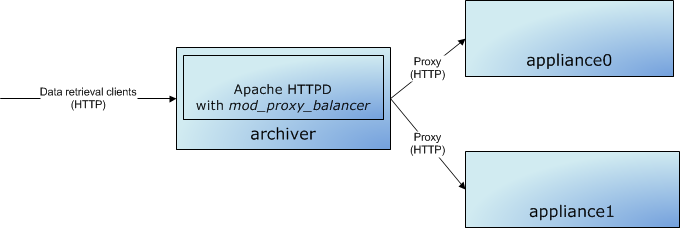
Note there are also other load-balancing solutions available that load-balance the HTTP protocol that may be more appropriate for your installation.
Also, note that Apache+Tomcat can also use a binary protocol called
AJPfor load-balancing between Apache and Tomcat. For this software, we should use simple HTTP; this workflow does not entail the additional complexity of theAJPprotocol.
archappl.properties
There is a site specific properties file called archappl.properties
that is typically present in WEB-INF/classes of all the webapps or as
the environment variable ARCHAPPL_PROPERTIES_FILENAME. This contains
various configuration elements that are common to all machines in the
cluster and probably common to all deployments of the archiver appliance
in your infrastructure. One of the advantages of having your site
specific properties checked into the source repository is that as the
system evolves and we add new configuration elements, default values for
these new configuration elements can be added to archappl.properties
of all the sites. The configuration elements present here are
configuration decisions that are made during the initial scoping of your
archiving project; so, please do look at these configuration elements
and make choices appropriate to your installation.
Key Mapping
The archiver appliance stores data in chunks that have a well defined key. The key is based on
The PV Name
The time partition of the chunk
For example, using the
default
key mapping strategy, data for the PV EIOC:LI30:MP01:HEARTBEAT for the
timeframe 2012-08-24T16:xx:xx.xxxZ on an hourly partition is stored
under the key EIOC/LI30/MP01/HEARTBEAT:2012_08_24_16.pb. Data for the
same PV in a daily partition is stored under the key
EIOC/LI30/MP01/HEARTBEAT:2012_08_24.pb for the day
2012-08-24Txx:xx:xx.xxxZ.
To use the default key mapping strategy, it is important (for performance reasons) that the PV names follow a good naming convention that distributes the chunks into many folders - see the Javadoc for more details. If the key/file structure reflecting the PV naming convention feature is not important to you, you can choose to use an alternate key mapping strategy by implementing the PVNameToKeyMapping interface and setting this property to name of the implementing class.
Persistence
By default, the configuration for each appliance is stored in a relational database (using connections obtained from JNDI) as key/value pairs. The install guide has instructions on how to set up a MySQL connection pool in tomcat. For smaller installs with minimal concurrent access, one can also configure Tomcat to use a SQLite backend.
Alternate mechanisms for persisting archiver configuration are possible; see the ConfigPersistence interface. To save your configuration in a different location, create an implementation of this interface and use the ARCHAPPL_PERSISTENCE_LAYER environment in your startup scripts.