Submit a PV for archiving
The EPICS Archiver Appliance offers a web UI for typical configuration tasks. This UI works best with a recent version of Firefox or Chrome.
Go to the home page of the archiver appliance.
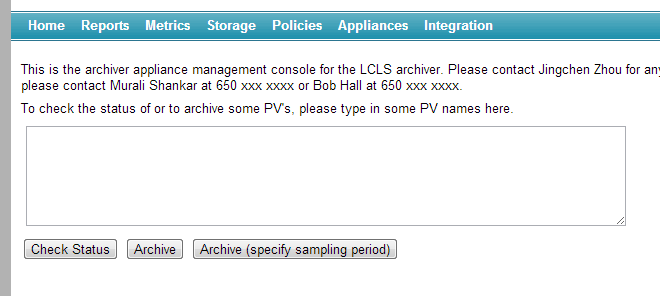
Enter any number of PV’s in the text area (one per line) and click on the
Archivebutton.If you wish to specify the sampling period, then click on the
Archive (specify sampling period)button instead.When adding a new PV to the cluster, the archiver appliance measures various parameters about the PV. This takes about 4-5 minutes during which the PV is in an
Initial samplingstate.Once the PV’s characteristics have been measured, the appliance assigns the PV to an appliance in the cluster and the PV transitions to a
Being archivedstate.If the archiver appliance is not able to connect to a PV, the PV stays in the
Initial samplingstate until it is able to connect.You can request a PV to be archived before it is available on the network. The request to archive the PV is stored in the persistent configuration until the archiver appliance can connect. Once the archiver appliance is able to connect to the PV, it continues on the normal workflow (where various parameters about the PV are measured etc).
Using
Archive (specify sampling period), you can additionally specifyArchival method: Whether the archiver will use CA monitors/scan threads to sample at the specified sampling period.
Conditional archiving PV: The archiving for this PV is performed only when the conditional archiving PV’s
.VALfield is non-zero.Policy: The archiver appliance uses policies set up the administrator to configure how the PV is to be archived. You can override this by choosing a policy yourself. This lets your system administrator set up a set of policies and lets the user choose manually from among those policies.
To add a PVAccess PV, use the
pva://prefix. For example,pva://BMAD:SYS:CU_HXR:DESIGN:TWISSconnects to the PVBMAD:SYS:CU_HXR:DESIGN:TWISSover PVAccess
Check the status of a PV
Enter any number of PV’s in the text area (one per line) and click on the
Check Statusbutton.You can also enter GLOB expressions like
XCOR*and the archiver appliance will then display the status of all PV’s that match the GLOB expression.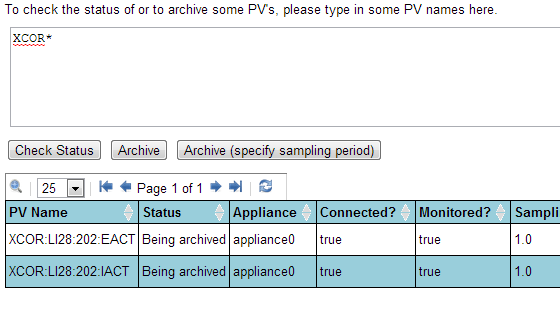
Note that the number of matched PV’s can be quite large; for now, no attempt is made to restrict the number of entries in this particular request. This may change in the future based on user feedback.